What syncs
What the Shopify integration does
- Customers
- Orders and fulfilment status
- Abandoned checkouts
- Product catalogue
How teams use it
In practice
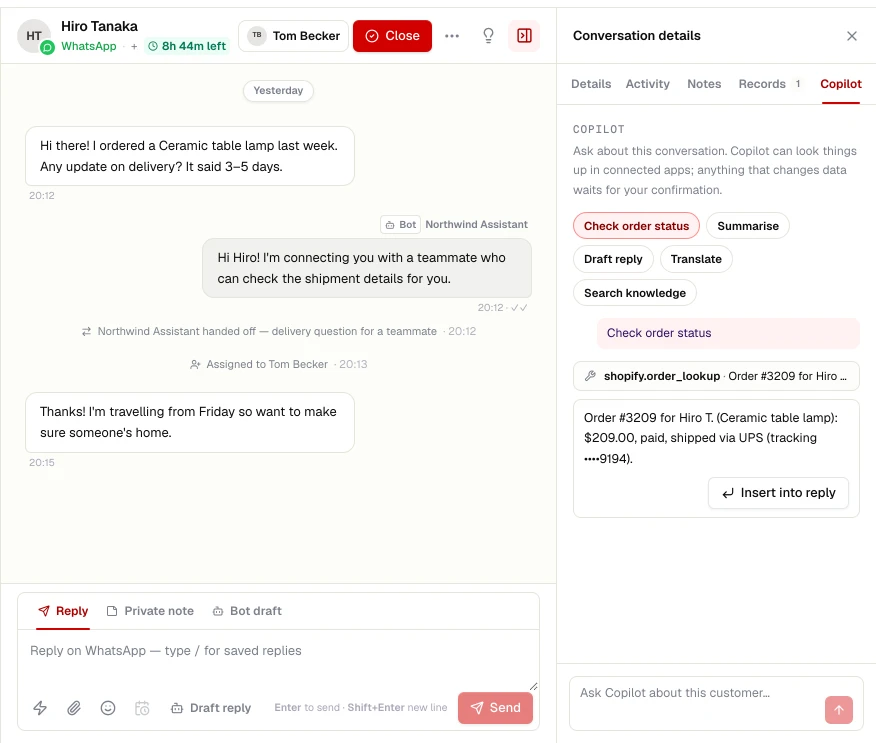
- AI agents and flows look up orders and shipment status
- The copilot shows recent orders and payments beside the chat
- Payment links sent inside the conversation
- Abandoned checkout and order-update messages as templates
Set up
Connect Shopify
- STEP 01
Open Integrations
In your workspace, go to Settings → Integrations and choose Shopify.
- STEP 02
Sign in
Authorise ChatRhino with your Shopify account and enter your store domain.
- STEP 03
Choose what syncs
Pick the objects and events to sync, then test the connection.
Related
More Commerce integrations
WooCommerce
Order lookups and customer sync for WordPress stores.
Learn moreRazorpay
Send payment links in chat and get notified when they are paid.
Learn moreHubSpot
Create contacts and deals from qualified chats, and log every conversation to the timeline.
Learn moreSalesforce
Push leads and cases into Salesforce with field mapping and owner routing.
Learn more