What you get
WhatsApp in ChatRhino
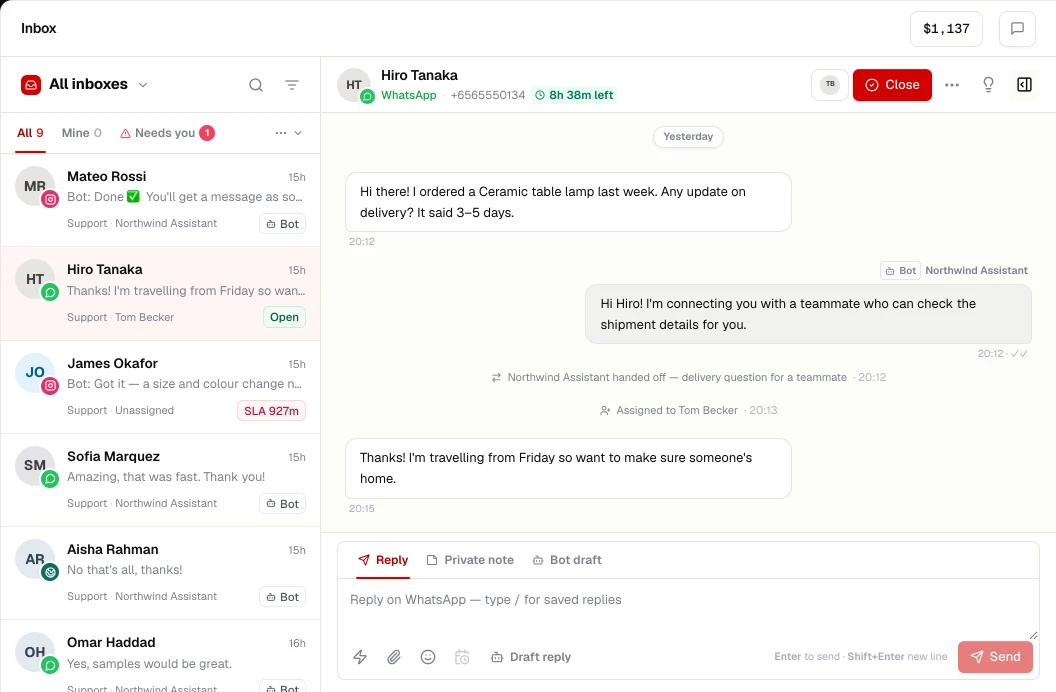
- Shared inbox with assignment, notes and canned replies
- AI agents and flows that use free-form replies while the 24-hour window is open
- Template creation, category guidance and approval status sync
- Opt-in campaigns with STOP handling and cost estimates
- Number quality and messaging-limit visibility
- Media, buttons, lists and interactive messages
WhatsApp is the only channel where Meta charges per message, and only for template messages. Service replies inside the 24-hour window are free, and utility templates sent inside an open window are not charged under Meta's per-message pricing. As of November 2026
Read: WhatsApp message categories, the 24-hour window and opt-in rules.
Set up
Connect WhatsApp in 5 steps
- STEP 01
Prepare a number
Use a phone number that is not active on the WhatsApp app or WhatsApp Business app, or migrate it.
- STEP 02
Verify your business
Have your Meta Business Portfolio and business documents ready; verification raises messaging limits.
- STEP 03
Connect in ChatRhino
Go to Channels → WhatsApp and complete the connection through your provider.
- STEP 04
Create templates
Write and submit your first utility and marketing templates for approval.
- STEP 05
Go live
Deploy an AI agent or flow, invite your team and import contacts with consent.
More channels
Works alongside
Answer Instagram Direct Messages from a shared inbox with your other channels, and let AI agents handle routine questions with human handoff.
Learn moreMessenger
Bring Facebook Page Messenger conversations into a shared inbox with WhatsApp and Instagram, with AI agents and handoff to your team.
Learn moreWebsite chat
Add a branded chat widget to any website — HTML, WordPress, Shopify, Webflow, React, Next.js and more — with an AI agent that hands over to your team.
Learn moreBring your support email into the same inbox as WhatsApp and chat — by forwarding, SMTP, Gmail or Outlook — with one contact history per customer.
Learn more