ChatRhino

Feature · Templates

WhatsApp templates without the guesswork.

Business-initiated WhatsApp messages need an approved template. ChatRhino helps you write it, choose the right category and know what it will cost.

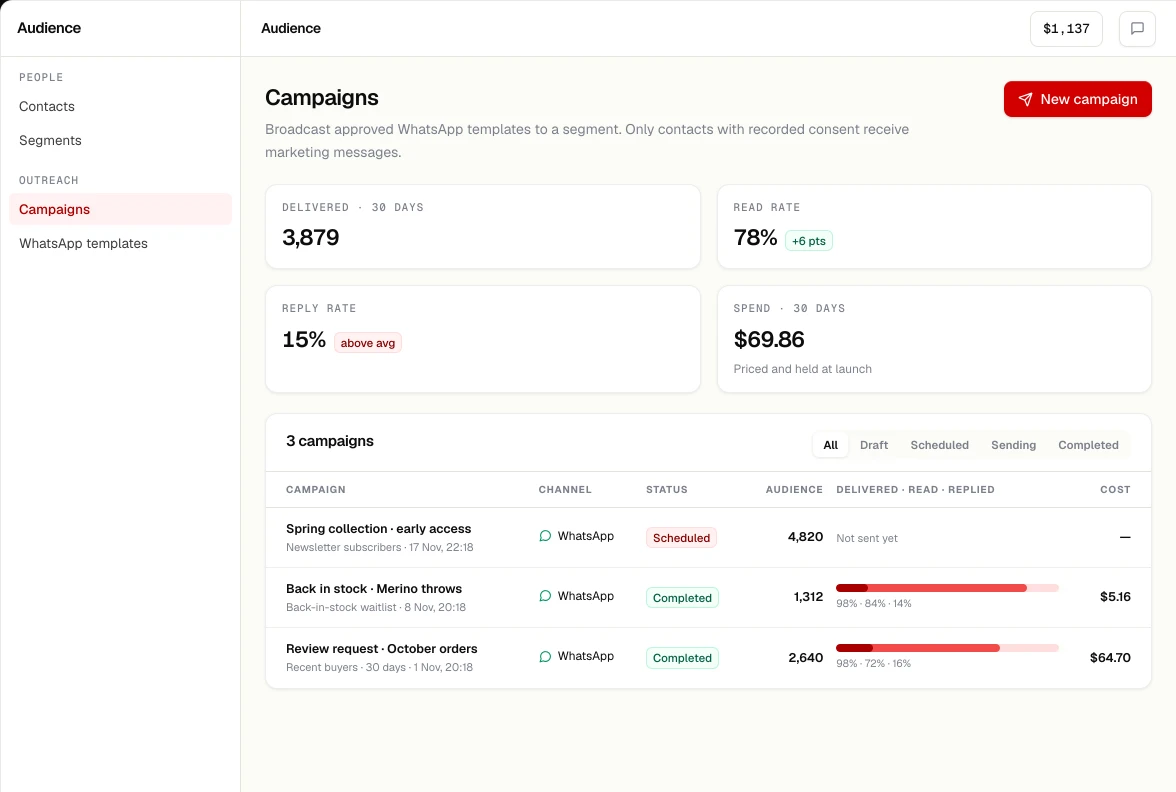
Campaigns: WhatsApp broadcasts with audience, status, delivered, read and replied rates and cost.

How it works

From draft to approved

01

Write

Header, body with {{variables}}, footer, quick-reply or call-to-action buttons, media.

02

Categorise

Guidance on marketing vs utility vs authentication, because the category decides the price.

03

Preview

Fill sample values and see the message as the customer will.

04

Submit & sync

Submit through your provider; approved, rejected and paused statuses sync back.

Why it matters

The category is the price

Meta charges by template category, and may re-categorise a template it thinks is mislabelled. Read our guide to WhatsApp message categories before you write.

FAQ

Questions, answered

Do I need a template to reply to a customer?

Not inside the 24-hour customer service window that opens when they message you. Outside it, you need an approved template.

Who approves templates?

Meta reviews templates. ChatRhino submits them through your connected WhatsApp provider and syncs the status.

Can I see the cost before sending?

Yes. Campaigns estimate cost from the template category and your rate card before you confirm.